


What diners check before they choose a restaurant
Most diners look you up before they come. In a 2019 survey of 1,101 American adults by the agency MGH, reported by Restaurant Dive, 77% said they visit a restaurant’s website before they dine in or order out. The menu was the main thing that shaped their decision, and nearly 70% said a restaurant’s website had put them off going there.
A hungry person on a phone usually wants to know:
- What is on the menu, and what does it cost?
- Are you open right now?
- Can I book a table, or order for pickup?
- Where are you, and is there parking or transit nearby?
- Is there something I can eat if I am vegetarian or have an allergy?
Put your menu on a web page
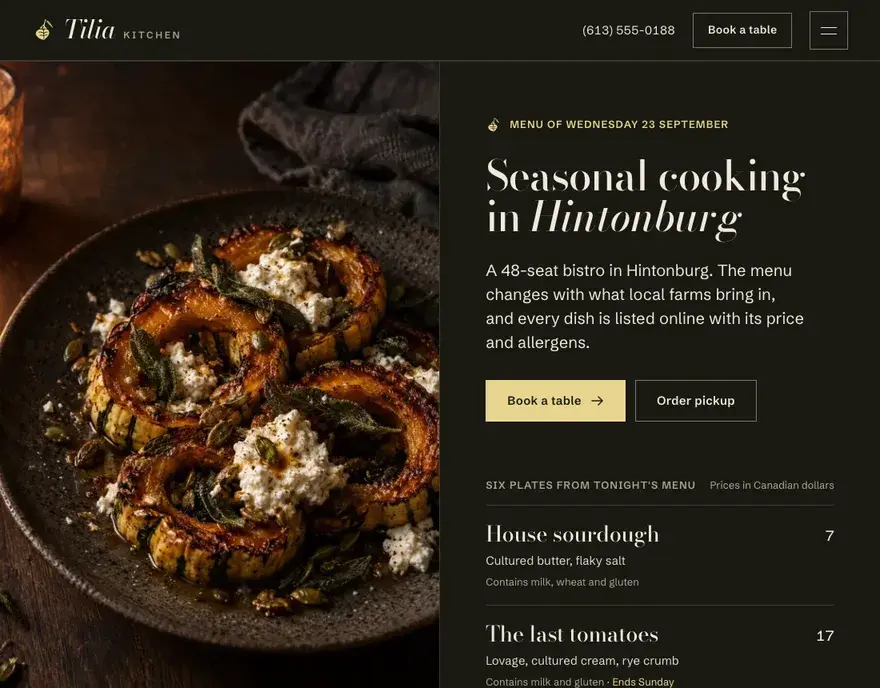
A menu built as a web page does several jobs a PDF cannot do well. It fits any screen. It opens faster than a PDF. You can change a price without sending a new file to a designer. And Google can read it. According to Google’s help page on the menu editor, Google may copy menu data from your website so it appears on your Business Profile.
We build each menu with sections for starters, mains, desserts and drinks, a short description and price for each dish, and icons for vegetarian, vegan and gluten-free options. We also tag each dish, description and price in a format that search engines can read. If you still want a printable version, we add a download link below the web menu.
Online ordering and the cost of delivery apps
Delivery apps bring in new customers, but they charge for it. As of September 2026, DoorDash’s Canadian pricing page lists delivery commissions of 20%, 25% or 29% per order depending on the plan, and 8% to 10% on pickup orders. On a $60 delivery order, that is about $12 to $17.
A direct ordering page on your own website works differently. Most direct ordering systems charge a monthly fee or a card processing fee instead of a commission on each order. You also keep the customer’s name and email, so you can tell them about a new menu or a Tuesday special.
We usually suggest a mix:
- Stay on the apps for the new customers they find.
- Put a direct “Order online” button at the top of your website and your Google Business Profile.
- Add a card to app delivery bags that sends regulars to your own ordering page.
We connect the ordering system that fits your point of sale, such as Square or Toast, and style the ordering page to match the rest of your site.
Reservations
Put a “Book a table” button in the header, where it stays visible on every page. If you use OpenTable, Resy or Tock, we link or embed your booking page. For parties over eight, a separate request form asks for the date, the number of guests and any dietary needs, so you can reply with a set menu and a deposit amount.
Menu, hours and links on your Google Business Profile
Your Google Business Profile shows up in Google Maps and search results, often before your website does. Keep these in step with your site:
- Your regular hours and your holiday hours.
- Your menu, either added in Google’s menu editor or read from your website.
- An “Order online” link that points to your own ordering page first.
- A reservation link to your booking system.
- Recent photos of the dining room and your most popular dishes.
When you change your hours for a holiday, change them on the website and on Google on the same day. Our local SEO service can keep this up to date for you each month.
Allergens and dietary information
Health Canada names eleven priority food allergens, including peanuts, tree nuts, sesame, milk, eggs, fish, shellfish, wheat and mustard. Its allergen labelling rules apply to prepackaged foods, so a dish made in your kitchen does not need a label. A clear allergen note on your online menu still saves your staff time on the phone and helps diners decide before they visit.
We add simple markers next to each dish and a short note that tells diners to confirm with their server. You decide how much detail to show.
Fast pages on a phone
Food photos are large files, and a slow page loses people. We resize and compress every photo, load images lower on the page only when the visitor scrolls to them, and keep the menu page free of heavy video. The target is a menu that shows up in about two seconds on a phone over mobile data. Our web design service explains how we test speed before launch.
The pages a restaurant website needs
- Homepage with your hours today, a “Book a table” button and an “Order online” button.
- Menu page, with separate sections for lunch, dinner, brunch or drinks if you need them.
- Online ordering page for pickup and delivery.
- Catering page with packages, minimum orders and a request form.
- Private events page with room size, capacity and a booking request form.
- About page with your story, your chef and your suppliers.
- Location page with a map, parking, transit and accessibility details.


