


What patients look for on a dental website
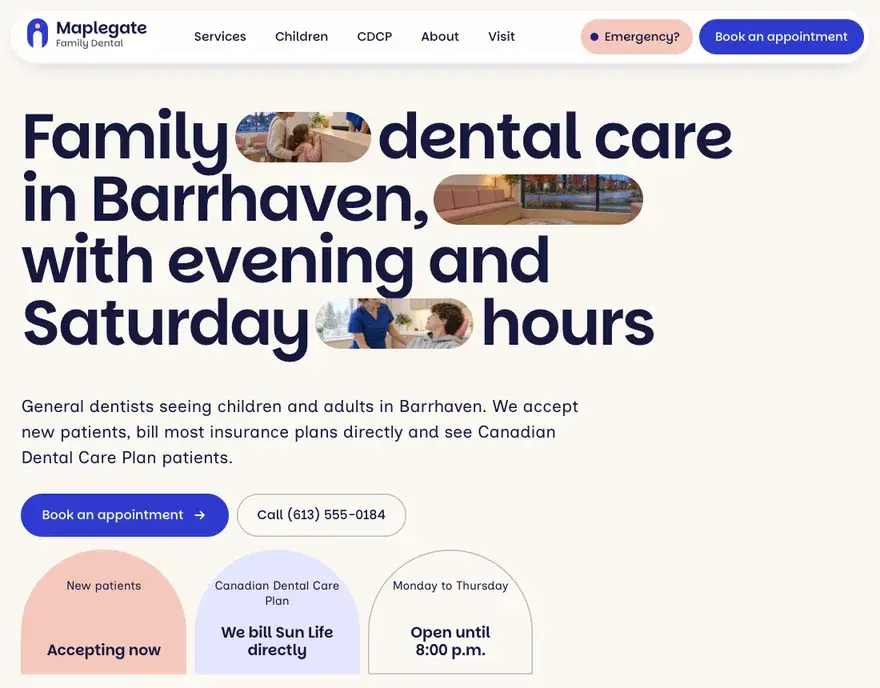
Patients want to know if you take new patients, whether you bill their insurance, when you are open and how soon they can get in. Many of them look you up on a phone, often at work or while they are in pain, so the site has to work well on a small screen. They check for:
- Whether you accept new patients, and whether you see children.
- Your hours, including evenings and Saturdays if you offer them.
- Which insurance you bill directly, and whether you accept CDCP patients.
- Parking, transit and wheelchair access.
- A way to book or request a time online.
- What to do about a dental emergency.
The pages a dental clinic website needs
- A homepage with your new patient status, hours, phone number and a booking button near the top.
- A page for each service, such as checkups and cleanings, fillings, root canals, crowns and children’s dentistry.
- A new patients page with online forms and a list of what to bring.
- An insurance page that covers direct billing, the Canadian Dental Care Plan and Healthy Smiles Ontario if you accept it.
- An emergency page with same-day booking and after-hours advice.
- A team page with each dentist’s and hygienist’s name and registration category.
- A contact page with a map, parking details and accessibility information.
RCDSO advertising rules for dental websites
The Royal College of Dental Surgeons of Ontario counts a website as professional advertising. Its Professional Advertising practice advisory and the professional misconduct regulation under the Dentistry Act, 1991 set the limits. A dental website must not include:
- Testimonials or patient reviews, or any statement that can only be checked against someone’s feelings or opinions.
- Words that suggest superiority, such as “state of the art”, “best” or “leading”.
- Comparisons with other dentists or clinics.
- Claims that create an expectation of good results, or that play on fear.
- Giveaways, contests, draws, or free products or services, such as free whitening for new patients.
- Continuing education courses, association memberships, or degrees that were not required for registration.
Any page that mentions a procedure or treatment must say whether the dentist is a general practitioner or a specialist, and name the specialty. If you publish a fee, the college treats it as the maximum fee for every patient, including lab costs. The college’s one-page Advertising with Integrity summary is a useful checklist.
Online booking and new patient forms
Online booking cuts the calls back and forth between your front desk and the patient. It also lets patients book at 10 p.m., after the office has closed. We set it up in one of two ways, depending on your practice software:
- A booking request form. The patient picks a reason and preferred times, and your team confirms by phone or email.
- Live online booking. The patient picks an open slot that syncs with your schedule.
Keep the first form short, with the patient’s name, phone, email, reason for the visit and whether they are new or returning. Send health history, medications and insurance details through a secure form tool. Dentists are health information custodians under the Personal Health Information Protection Act, and regular email is a poor place for a medication list.
The Canadian Dental Care Plan and emergency visits
The Canadian Dental Care Plan covers eligible residents who have no access to dental insurance and an adjusted family net income under $90,000. Clinics bill Sun Life directly, and patients may owe a co-payment and extra charges. The federal government tells CDCP members to confirm that a clinic accepts them and to ask about extra costs before they book. A short CDCP page answers those questions before the phone rings:
- Whether you accept CDCP patients.
- That you bill Sun Life directly, so patients do not pay the full cost up front.
- How co-payments work and which services may cost extra.
- What information to have ready when they book.
An emergency page does the same job for patients in pain. It shows how to get a same-day visit, lists what counts as a dental emergency and says when to go to a hospital instead, such as swelling that affects breathing. Put the phone number in a large tap-to-call button. RCDSO rules still apply here, so describe symptoms and next steps plainly and avoid fear-based wording.


